Route planning · the Delivon appDelivery route planning:
Delivery route planning:
from addresses to a clear order of work.
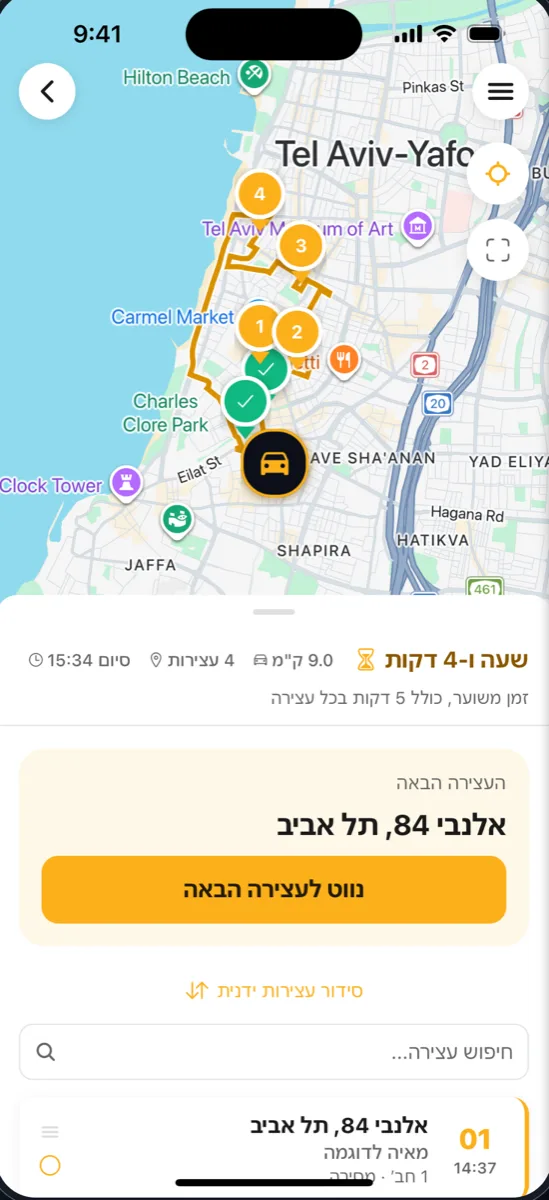
Enter the day's addresses, Delivon orders the stops, and you navigate to the next one with a tap. No more working out in your head where to start and where to finish.
How it works
Four steps from labels to a route.
- 01
Set the start and the end
Your current location or a fixed address: the warehouse, home, the pickup point. Finish at the same place or somewhere else.
- 02
Add the stops
Scan a label, say the address or type it. Address, name and phone go into the stop without retyping.
- 03
Delivon orders them
The stops fall into a sensible driving order. Want it different? Drag and reorder by hand.
- 04
Drive and update
Navigate to the next stop with Waze or Google Maps, and when you are done: delivered, or not delivered with the reason.
During the dayThe route is alive,
The route is alive,
not a list printed in the morning.
- A stop added mid-day joins the existing route, no rebuilding
- No signal? Statuses are saved on the phone and sent when it returns
- Every drop is documented with a photo, a signature, location and time
- A fleet driver gets the route from the manager straight to the phone, nothing to type
Route planning questions
What drivers ask before they start
- Do I have to type every address?
- No. Photograph the label and the address, name and phone go in by themselves. You can also say the address or type it, whatever is convenient at that moment.
- Can I change the order the app picked?
- Yes. The suggested order is a starting point. Drag a stop to another place in the list and the route updates.
- How many stops can a route hold?
- During the trial and on the Premium plan there is no cap on routes or stops. Plan details are on the home page.
- What happens when there is no signal?
- The route is already on the phone. Marking a delivery, the photo and the signature are saved on the device and sent by themselves when the signal returns.
Download the app
and plan tomorrow\'s route.
The download is free. 21 days with everything unlocked, no credit card.